On the Article detail page we write the text of an article and set where and when it is to be shown. We open it from the list of articles by clicking the title or with the Edit button; with the back to articles list button we return without saving.
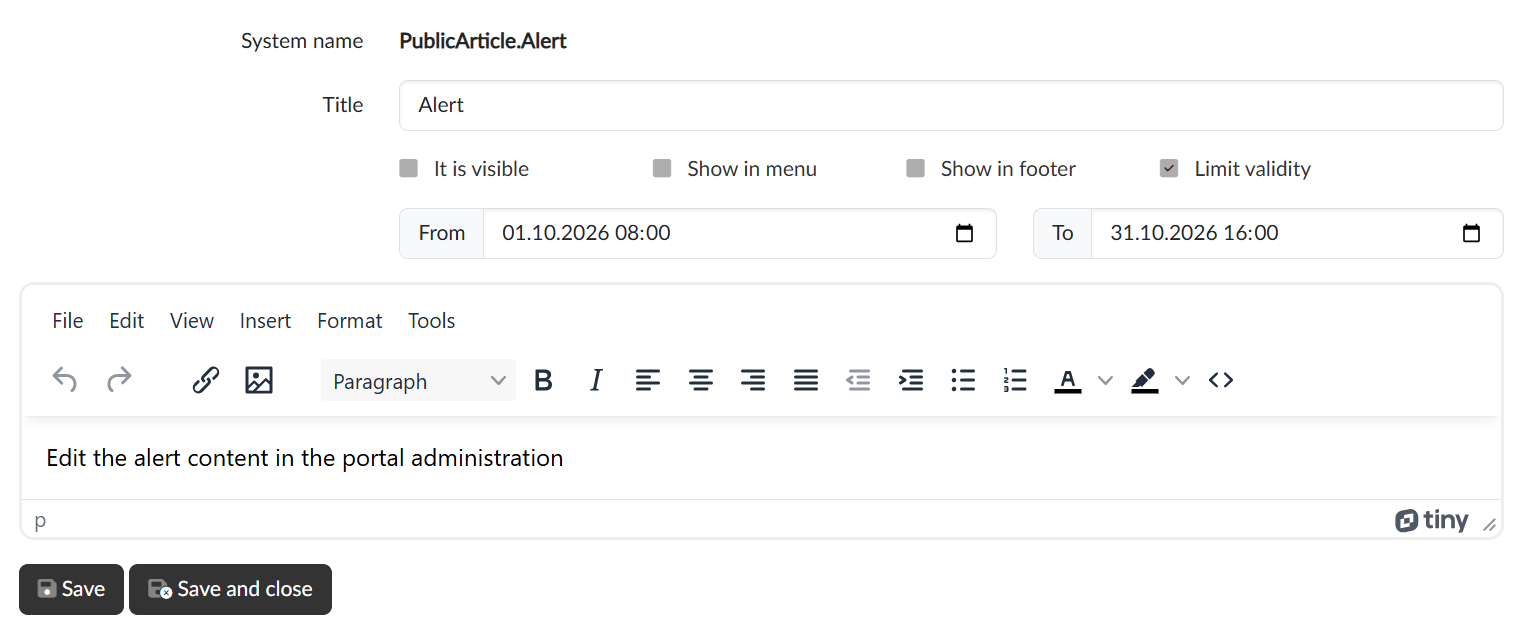
System name and title
- System name — the internal label of the article. For a regular article we can edit it; for a system article it is fixed, because it determines the place where the text is shown on the portal.
- Title — the heading of the article. For regular articles it is also the name of the item in the menu and in the footer.
Display
- It is visible — an article that is switched off is not shown on the portal. Useful for a text in progress or for temporarily taking down a notice. For system articles we cannot change this checkbox.
- Show in menu — the article is offered in the main menu of the portal in the Articles group. The group appears in the menu as soon as the portal has at least one such article.
- Show in footer — a link to the article is added to the footer of the portal.
- Limit validity — once ticked, the From and To fields are shown; the article is then visible only in this period. We use this mainly for time-limited notices.
The text of the article
We write the content in an editor with the usual formatting (headings, lists, links, tables). Images inserted into the text are saved on the portal together with the article.
Saving
With the Save button we save the changes and stay on the page; with the Save and close button we return to the list after saving.