On some portals we are not only viewers — the student role also lets us upload a video or audio ourselves, add a description to it and manage it. The same editorial part of the portal serves for that as for the authors, only in a limited form and with a few extra rules. This article sums up how the student's view differs; the details of the individual screens are in the for authors and editors part of the manual.
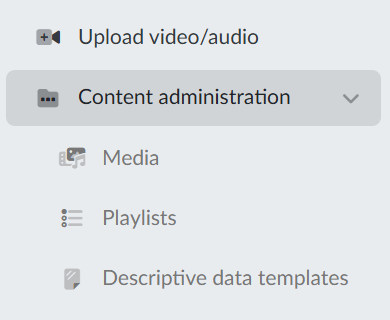
The editorial part in the main menu
Once we log in, the editorial part appears below the public items of the menu. A student has in it:
- Upload video/audio — uploading a new medium,
- Content administration with the sub-items Media, Playlists and Descriptive data templates.
Compared with authors and editors, we do not find Stream live, My channels or My team in the menu, nor the items Streams, Channels, User lists and Publishing and security templates in Content administration. Live broadcasting, setting up channels and managing other people's media therefore do not belong to a student.
Uploading media
Uploading works the same way as with the authors — the procedure is described in the article Media upload. The difference is in the templates: a student does not choose them. The portal itself assigns every uploaded medium the student descriptive data template and the student publishing and security template that the portal administrator has set. Thanks to that, every student medium has the same, predictable protection from the very start.
Our own media
In Content administration → Media we see only our own media and the media in the shared folders the administrator has given us access to; other people's media do not appear in our list. That is why the note student media is in the header of the list. Working with the list — the filters, the sorting and the actions in a row — is described in the article Media administration (video/audio).
In the detail of a medium we have the same tabs available as the authors, so we can add descriptive data, chapters, subtitles, a presentation or, for example, attachments to the medium.
Publishing and security
The only tab that is read-only for a student is Publishing and security. Instead of the form, the portal shows the warning Students do not have the right to change the protection settings of a medium. Who may see the medium is therefore decided by the student template assigned during the upload, not by us. For the same reason the Bulk actions above the list of media are missing the options Change protection for multiple files and Bulk application of publishing and security templates.
Playlists and descriptive data templates
From our own media we can put together playlists and use descriptive data templates, which prefill the recurring details for us. Both work the same way as with the authors, only in them we work with our own content alone.