The community of a channel is a team of collaborators defined by the owner of the channel. Together with them they can publish content in one place — on the channel page.
The cooperation of users in the community is divided into two levels:
- Collaborator — can work with the channel to the same extent as its owner
- Contributor — can publish media files to the channel
We see the members of the community in the Channel community members table together with their login, name, type of membership and status.

Adding a user to the community
Depending on the role we want to give the user, we use the Add collaborator or the Add contributor button. A dialog for selecting users opens, in which we look them up by their full surname or their exact login (the dialog finds nothing for incomplete details).
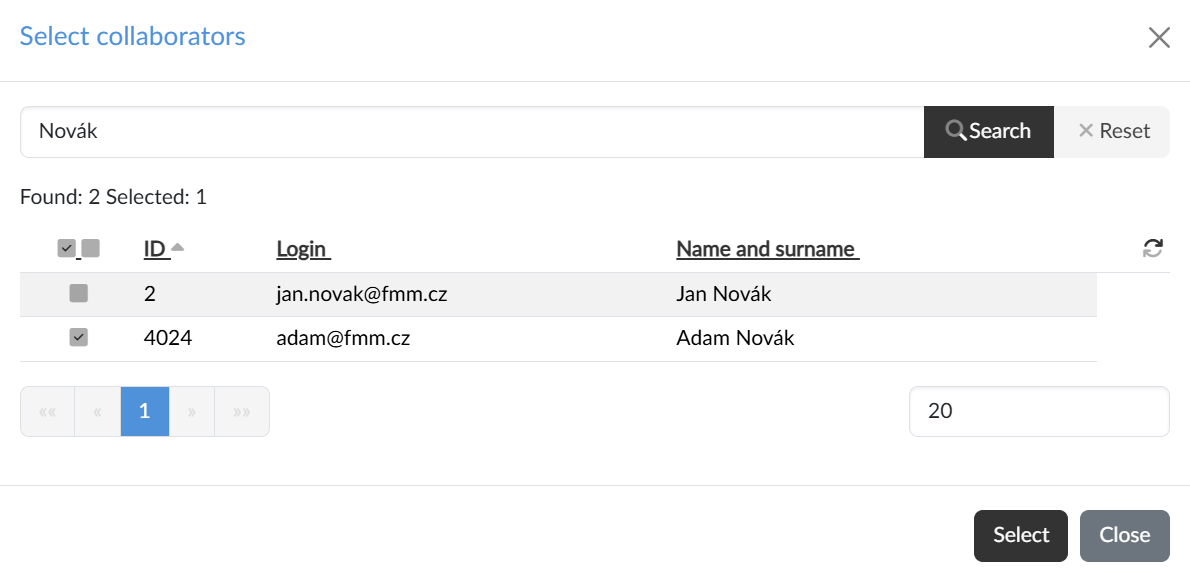
The checkboxes in the listing select individual users, the pair of icons in the header selects or deselects the whole page of results, and the Select button adds them to the community.
The selected users are sent an invitation with a link through which they confirm their consent; until then they are shown in the table with the status waiting for confirmation. Once confirmed, the status changes to team member.
Removing a user
A member of the channel community can be removed regardless of whether they have confirmed their consent or not — the Remove team member button at the end of the row serves that purpose. On removal, just as when inviting a user, the system sends a notification; it arrives as a system alert and an e-mail, depending on how the recipient has their notifications set up.